XTrack routes planning in three steps
A waste management company serving one of the districts of a large city coordinates the daily work of 25 waste collection vehicles, which carry out more than 13,000 collection orders each day. This equates to 260,000 operations per month. Each vehicle collects waste from between 400 and 700 containers on a single route, which equates to between 8,000 and 14,000 emptied containers per month.
Every day, thousands of vehicles travel the streets of cities, towns and villages to collect waste from residents, public institutions and businesses. The number of operations they carry out – separately for each waste fraction – highlights the scale of the challenge and the need for a systematic approach to field task planning.
How does our solution support dispatchers in their daily work? What is the overall process of planning and delegating? Below we explain the key steps that are carried out using XTrack tools.
Step 1:
Let’s inform the XTrack system about the tasks awaiting the vehicles.
The first step in the planning process is to enter information into the system about waste collection points (WCPs) and the number and type of containers located at each one. This can be done by:
- bulk data import from files, or
- automatically synchronising the XTrack system with data stored in other enterprise IT systems using the REST API.
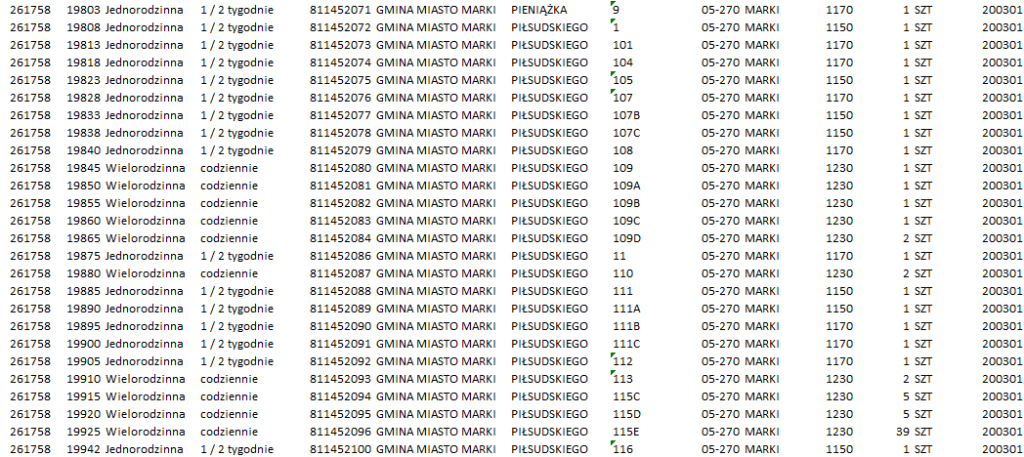
The system reconstructs the contents of the file in an interactive table linked to a map, where it then places containers of each waste fraction from each WCP (Waste Collection Point).
PRO TIPS!
- Have you designed routes and schedules in another system? Great! We’ll import the existing structure and route parameters.
- Just have a list of WCPs and need to identify their content? No problem, we can do that using our integrated inventory tools.
Result: An interactive table and associated map showing WCPs and containers.
Step 2:
Let’s include the dispatcher’s perspective on how tasks should be performed in the system.
In addition to the interactive table and map of containers mentioned in step 1, the dispatcher also has access to what is called a ‘logistics tree’. What is the tree? It is a graphical representation of the distribution of tasks. The starting point of the structure can be the name of the contract to be executed (usually a city or sector). The next, lower level of the tree could be, for example, a catalogue of waste fractions collected in the sector. For each fraction, the dispatcher can define any number of folders representing routes, i.e. sets of containers assigned to specific vehicles. The tree can reflect any number of contracts being executed, and for each of them the task organisation structure can vary.
Result: A logistics tree linked to the table and map from the previous step.
Step 3:
Let’s assign containers to routes.
We have now reached the stage where three interactive elements – the table and map with WCPs and containers, and the logistics tree – are ready for use and linked together. At this stage, the dispatcher can easily mark areas to be served by specific vehicles and assign containers located in these areas to the corresponding routes.
All that’s left is to define the frequency of each route so that the system can automatically prepare the routes for the day, complete with an electronic list of containers to be collected by each crew. The prepared routes are available in the on-board terminals with the XTrack WorkMate application.
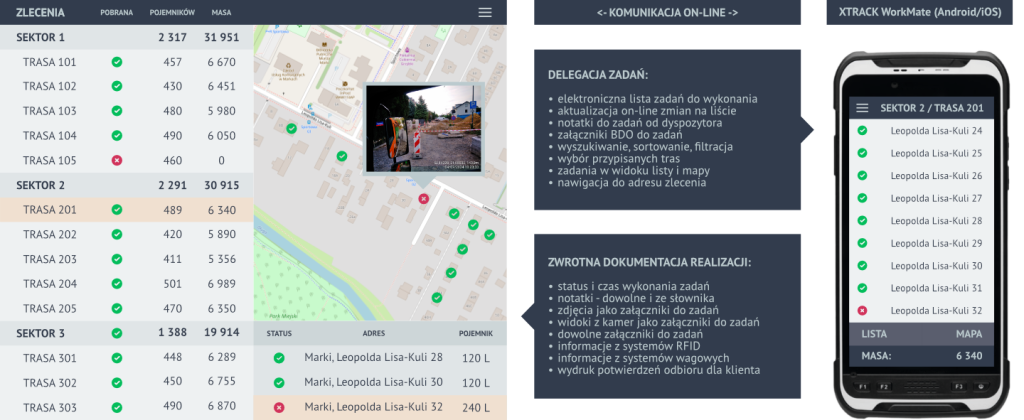
Result: Ready-to-use routes
The ABC of benefits of using the XTrack system for collection planning:
- Efficient management – you organise field operations in a way that best suits your business,
- Plan & play – you efficiently plan operations in a map view, set service schedules for individual routes and assign them to vehicles – the rest is done automatically,
- Optimal vehicle utilisation – you visualise the spatial distribution of routes on the map to avoid inefficient route overlaps,
- Execution monitoring – you track the progress of route execution in real time, enabling quick decisions to be made on the deployment of support vehicles,
- Easy data updates – you easily enter and Easy data updates – you can easily enter and update waste collection point data as contracts progress,
- Irregular cycle management – seamlessly manage disruptions to regular service cycles caused by holidays or other exceptions,
- Irregular cycle management – seamlessly manage disruptions to regular service cycles caused by holidays or other exceptions,
Finally, we invite you to read the study on the implementation and practical use of the XTrack System in the largest municipal waste management company in Poland, MPO Warsaw. https://mpo.com.pl/aktualnosci/621-jak-powstaja-trasy-smieciarek
Are you considering implementing or upgrading your scheduling system? Contact us – let’s find the best solution for your specific needs.